

Apple Vision Pro
Prices may vary. Click to see current price at retailer.
Technology has moved beyond the standard laptop – today's remote workers and professionals can supercharge their productivity with innovative AI-powered devices. From augmented reality glasses that create virtual monitors, to smart assistants that organize your day, these gadgets are redefining how we work daily.
We've compiled a list of 10 cutting-edge AI devices that go beyond laptops to boost efficiency and convenience. Whether you’re a digital nomad seeking a portable second screen or an executive looking to automate tasks with AI, these devices offer next-level solutions. Read on to discover how each device can fit into your workflow and transform your remote work experience.
Who Should Buy AI Productivity Devices?
1. Apple Vision Pro – Best Overall AR/VR Workspace
Apple Vision Pro
The Apple Vision Pro is a game-changer for productivity, essentially a wearable spatial computer that lets you create an unlimited virtual workspace. Slip on the sleek AR/VR headset and you'll see multiple resizable screens floating in your environment, powered by the Vision Pro’s dual Apple chips (including the new M-series processor for performance and an R1 chip for real-time sensor processing). This means you can have your email, documents, and video calls all open life-sized around you:contentReference[oaicite:0]{index=0}:contentReference[oaicite:1]{index=1}, controlled simply by where you look, subtle hand gestures, or voice commands.
In practice, the Vision Pro enables working from anywhere as if you had a multi-monitor setup – whether you're on the couch or in a hotel room:contentReference[oaicite:2]{index=2}. The twin 4K micro-OLED displays provide razor-sharp text and graphics, making coding or design work a joy. Video calls are ultra-immersive: using advanced machine learning, the Vision Pro creates a realistic 3D avatar (Persona) so you appear natural in FaceTime meetings:contentReference[oaicite:3]{index=3}. Built-in 3D audio and a 12MP 3D camera even allow you to capture and relive spatial photos and videos during breaks:contentReference[oaicite:4]{index=4}.
Despite its advanced tech, Apple focused on comfort – the Vision Pro features a modular strap system and a light, balanced design. Keep in mind it’s an early adopter device: it costs as much as a high-end laptop setup, and the external battery only lasts ~2 hours unplugged. But for professionals who want the absolute cutting edge, the Apple Vision Pro delivers an unparalleled, futuristic work environment that’s literally all around you.
Pros
- Revolutionary spatial computing with multiple virtual screens
- Intuitive eye, hand, and voice control interface
- Dual-chip (M2 + R1) for seamless real-time 3D performance
- Stunning dual 4K micro-OLED displays (23M pixels total)
- Immersive FaceTime with lifelike 3D avatars
- Highly polished build and comfort (custom fit Dual Knit band)
Cons
- Ultra-premium price tag
- Bulky headset, limited 2-hour battery pack
- Requires Apple ecosystem for full functionality
Prices may vary. Click to see current price at retailer.
Vision Pro Specifications
| Category | Spatial AR/VR Headset |
| Release | 2024 (US) |
| Key AI | Eye/Hand Tracking, ML Persona |
| Battery | Up to 2 hours (external pack) |
| Weight | approx. 1.5 lbs (680 g) |
2. Meta Quest 3 – Best Value Mixed Reality Headset

Meta Quest 3
The Meta Quest 3 brings mixed reality productivity to a wider audience at a relatively accessible price. This standalone headset (no wires or PC needed) offers significant upgrades over its predecessor: a slimmer build, sharper dual LCD displays (2064×2208 per eye):contentReference[oaicite:5]{index=5}, and Qualcomm's XR2 Gen 2 chipset for snappy performance. With these specs, the Quest 3 is perfectly capable of running multi-window browser setups, virtual desktop apps, and collaborative VR meeting platforms smoothly.
One highlight is the full-color passthrough mode, which uses dual 4MP cameras to let you see your real environment and overlay virtual screens or holograms onto it:contentReference[oaicite:6]{index=6}. For example, you could pin a life-sized web browser window next to a virtual Zoom call screen while still seeing your actual desk and keyboard. The mixed reality experience isn’t as ultra-crisp as the Vision Pro’s (text can be a bit grainy through the Quest’s cameras), but it's very workable for many tasks and far beyond what older VR headsets offered.
At about 515 g, the Quest 3 is lighter and more comfortable for extended wear, and Meta’s design improvements (pancake lenses for a wider field of view and less bulk) make a real difference:contentReference[oaicite:7]{index=7}. It lasts around 2 hours on battery – enough for meetings or focus sessions – and you can extend that with an external battery strap. Overall, the Quest 3 is the best value for dipping into AR/VR-enhanced work: it’s versatile, backed by Meta’s robust app ecosystem, and dramatically improves remote collaboration and multitasking without a sky-high price.
Pros
- Standalone VR/MR headset – no PC required
- High-res 2064×2208 per-eye LCDs (30% sharper than Quest 2)
- Color passthrough cameras enable mixed reality apps
- Powerful Snapdragon XR2 Gen 2 chip for smooth performance
- Lighter, more comfortable design with improved optics
- Large content library for productivity and collaboration
Cons
- Lacks eye/face tracking (found in pricier headsets)
- Passthrough AR video is low-res for fine text
- Short 2–3 hour battery life per charge
Prices may vary. Click to see current price at retailer.
Quest 3 Specifications
| Category | VR/MR Headset |
| Release | 2023 |
| Key AI | Inside-out Tracking, Passthrough AR |
| Battery | 2–3 hours per charge |
| Weight | 1.14 lbs (515 g) |
3. XREAL Air AR Glasses – Best Portable Second Screen

XREAL Air (AR Glasses)
XREAL Air is a set of augmented reality glasses that function like a personal, portable monitor – perfect for expanding your screen space on the go. Slip on these sleek sunglasses-style frames, connect them to your device (via USB-C or HDMI adapter), and you'll see a massive virtual screen hovering in your view. The experience is akin to watching a 120-inch projector from about 10 feet away, but only you can see it. The dual Micro-OLED displays inside the lenses deliver a crisp 1080p image for each eye, resulting in sharp text and vibrant videos when working or unwinding with content.
For remote workers, XREAL Air can greatly enhance productivity: you can use them as a second (or third) monitor anywhere – no physical display needed. Many use cases abound: coding while referencing documentation on a huge virtual screen, editing spreadsheets on an “external” display in a coffee shop, or even just having a private cinema for catching up on tutorials during flights. They weigh under 80 grams, so you can wear them comfortably for long stretches; and unlike bulky VR headsets, these look and feel like regular sunglasses.
It's worth noting that the XREAL Air doesn't provide spatial tracking of your surroundings – the virtual screen stays fixed in front of you rather than anchored to a physical space. Essentially, it's like a floating external monitor rather than true mixed reality. But given the ease of use (draws power and video from your phone or laptop, with no extra batteries or OS to manage) and relative affordability, these AR glasses have become a favorite tool for digital nomads and creatives seeking a big-screen boost to productivity wherever they work.
Pros
- Projects up to a 130” virtual HD screen in front of you
- Lightweight, glasses-style form factor (just 79 g)
- High-quality 1080p Micro-OLED displays (3300 PPI) for each eye
- Plug-and-play via USB-C or adapter (works with phones, laptops, consoles)
- Comfortable for extended use with adjustable nose pads
- Great for travel – private big-screen experience on planes/trains
Cons
- Requires a tethered device (phone/laptop) for power & content
- No head tracking or true 3D overlays (fixed screen projection)
- Not ideal in very bright environments
Prices may vary. Click to see current price at retailer.
XREAL Air Specifications
| Category | AR Display Glasses |
| Release | 2022 |
| Key AI | Built-in Micro-OLED (no CPU) |
| Battery | None (USB-C powered) |
| Weight | 0.17 lbs (79 g) |
4. Insta360 Link – Best AI 4K Webcam for Video Calls
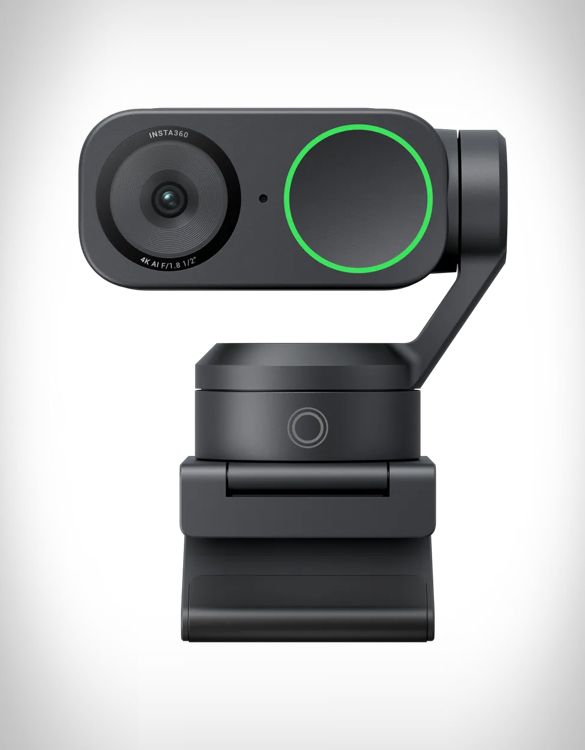
Insta360 Link AI Webcam
The Insta360 Link is a premium AI webcam that has become a go-to for professionals who spend their days on video calls or live streams. Unlike typical static webcams, the Link sits on a tiny 3-axis motorized gimbal. This means it can physically rotate and tilt to track your movements – powered by AI computer vision, it keeps you centered in frame if you stand up or move around your workspace, all without any manual adjustment:contentReference[oaicite:8]{index=8}. For presenters and teachers, this is a game changer: you can whiteboard or demonstrate physical products, and the camera smoothly follows you.
Video quality is top-notch. The Link can output 4K at 30 fps, and it uses a large 1/2-inch image sensor (much larger than typical webcam sensors), so your image stays clear even in dim home office lighting. With HDR mode, it balances out bright windows or dark corners, ensuring you look professional on calls:contentReference[oaicite:9]{index=9}. AI features abound – you can enable Whiteboard Mode by placing included markers on a board; the camera then zooms and enhances the board so remote viewers see it clearly. DeskView Mode tilts the camera downward to show your tabletop (great for unboxing or sketching demos) while automatically correcting perspective to a top-down view.
In practice, setup is plug-and-play via USB, and an easy desktop software gives fine control if needed. The Link also recognizes hand gestures – hold up a hand to turn tracking on/off, or make an “L” shape with fingers to zoom in:contentReference[oaicite:10]{index=10} – no need to fumble in software menus mid-call. Between the excellent 4K image, AI auto-framing, and versatile modes, Insta360 Link adds a level of polish and freedom to virtual meetings that standard webcams just can’t match, making it well worth it for those who rely on remote video communication.
Pros
- 4K Ultra HD resolution with large 1/2” sensor for superb clarity
- AI-powered 3-axis gimbal automatically tracks your face and movements
- Gesture control support (e.g., raise hand to zoom or enable tracking)
- Special modes: Whiteboard mode, DeskView (overhead) mode, etc.
- HDR support for balanced lighting in challenging conditions
- Dual noise-canceling mics for clear audio on calls
Cons
- Higher cost than standard 1080p webcams
- Needs good lighting for optimal image quality
- Desktop only (not designed for mobile use)
Prices may vary. Click to see current price at retailer.
Insta360 Link Specifications
| Category | AI 4K Webcam |
| Release | 2022 |
| Key AI | Auto-Tracking Gimbal |
| Battery | None (USB-powered) |
| Weight | 3.7 oz (106 g) |
5. Amazon Echo Show 15 (2nd Gen, 2024) – Best Smart Display Hub
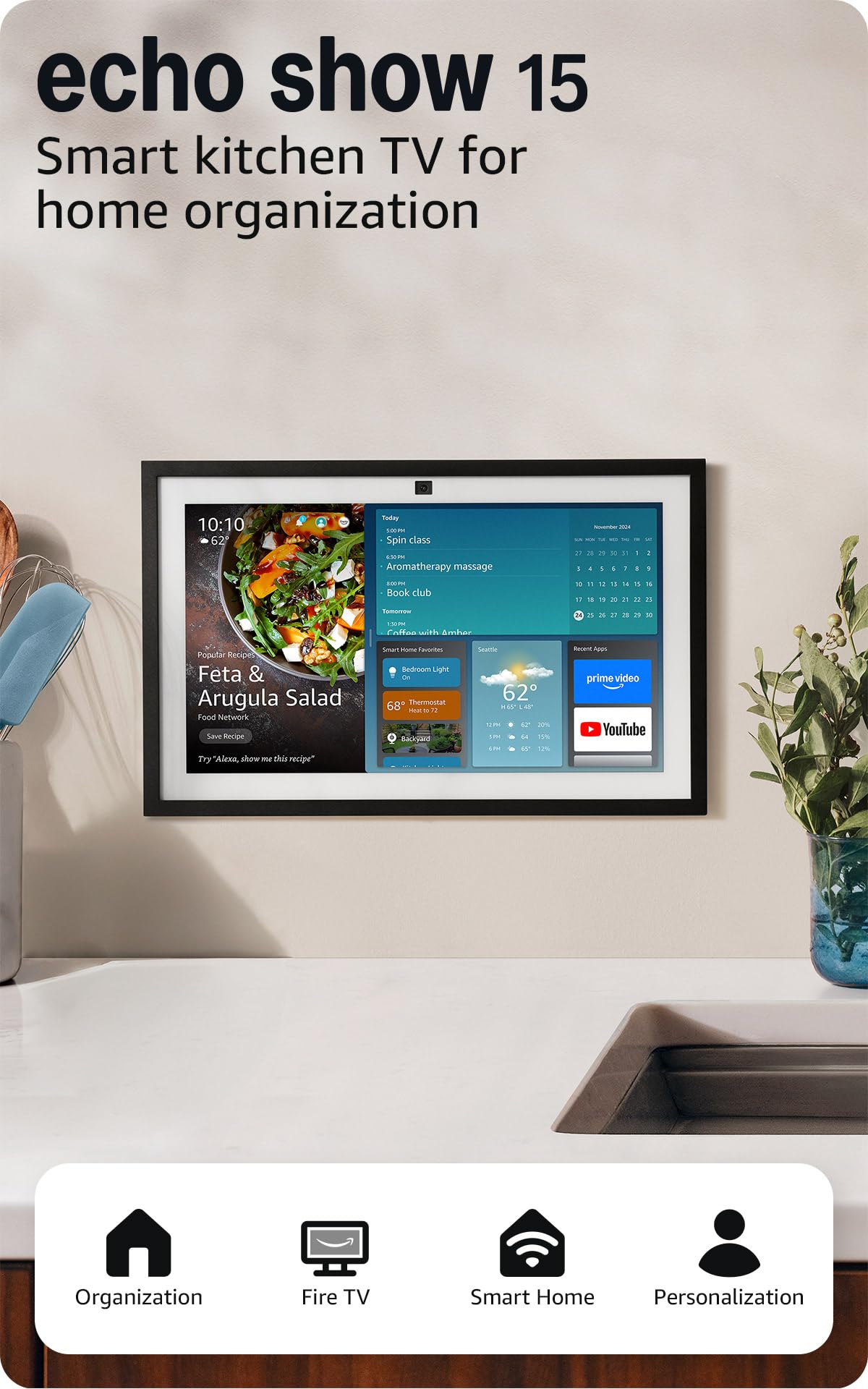
Amazon Echo Show 15 (2024)
The Echo Show 15 (2nd Gen) is Amazon’s largest and most capable smart display, essentially an AI-powered bulletin board and entertainment hub for your home office or kitchen. Its big 15.6-inch screen can be mounted on a wall or placed on a stand in either landscape or portrait orientation. With the updated 2024 model, Amazon included a faster processor and a new Fire TV interface built in:contentReference[oaicite:11]{index=11}, so beyond showing your calendar, weather, and tasks, it doubles as a TV – you can quickly jump into a Netflix show or join a Zoom meeting on the screen.
For productivity, the Echo Show 15 shines as a family or team coordination device. You can display a personal or shared Google/Office 365 calendar, digital sticky notes, to-do lists, and more via customizable widgets:contentReference[oaicite:12]{index=12}. Need to hop on a video call? The centered 13 MP camera now features auto-framing, keeping you in view if you move around the kitchen during a video meeting. Alexa’s AI voice assistant is always at the ready – you can ask for the day’s agenda, set reminders, dictate a quick email, or control smart lights and thermostats, all hands-free.
The Show 15’s interface is designed to be glanceable and very user-friendly. Multiple accounts can use visual ID or voice ID, so it recognizes who is in front of it and displays the right info for the right person. Privacy features (like a physical camera shutter and mic mute) are built in as well. While it’s not a traditional “work device” like a laptop, having an Echo Show 15 in your workspace can offload a lot of minor tasks (like looking up info, tracking packages, or managing your schedule via voice) and keep your household or work-life organized via one big, smart dashboard.
Pros
- Large 15.6” Full HD touchscreen for calendars, news, and multitasking
- Built-in Fire TV: stream videos or monitor security cams easily
- Customizable widget dashboard (to-do lists, weather, notes, smart home controls)
- Alexa voice assistant integration for hands-free info and control
- Upgraded 13 MP camera with auto-framing for video calls
- Perfect family/home command center for shared organization
Cons
- Takes up space (15.6″ panel) – usually wall-mounted
- Dependent on Alexa voice services and internet
- Speaker audio quality is decent but not hi-fi
Prices may vary. Click to see current price at retailer.
Echo Show 15 (2nd Gen) Specifications
| Category | Smart Display |
| Release | 2024 |
| Key AI | Alexa Voice Assistant |
| Battery | None (AC powered) |
| Weight | 4.85 lbs (2.2 kg) |
6. Plaud Note AI Voice Recorder – Best AI Note-Taking Device

Plaud Note AI Voice Recorder
The Plaud Note is like having a personal AI secretary in your pocket. This slim voice recorder uses artificial intelligence to transcribe and summarize your meetings or thoughts on the fly. Just hit record during a meeting or lecture – Plaud Note will capture everything with its dual noise-cancelling mics, then the magic happens in the cloud: it transcribes speech into text (with support for over 100 languages and even identifying different speakers), and can generate structured summaries or action item lists automatically:contentReference[oaicite:13]{index=13}:contentReference[oaicite:14]{index=14}.
Roughly the size of a credit card, the device is unobtrusive – you can slip it on a notebook or attach it magnetically to your phone. Professionals who spend lots of time in meetings or interviews will love that Plaud Note can produce a written record without any effort. For example, a journalist could record an interview and get an instant transcript with key quotes highlighted. A project manager could record a client call and receive a summarized report with tasks. The Plaud Note even has an innovative dual-mode: switch it to phone call mode, connect it to your phone, and it will record both sides of a phone conversation clearly:contentReference[oaicite:15]{index=15} (no more awkward note-taking during calls).
With 30-hour battery life and 64 GB storage, it’s built for heavy daily use. Through the companion app, you can search your recordings by keyword – the AI indexes everything, so finding that one idea from last month’s meeting is a breeze. Privacy and security are addressed with enterprise-grade encryption and compliance (the platform is ISO 27001 and GDPR compliant):contentReference[oaicite:16]{index=16}. If you frequently need to capture and recall information from conversations, Plaud Note can save you hours of manual transcription and ensure you never miss a detail.
Pros
- Ultra-thin, credit-card sized voice recorder (0.12" thick)
- 30 hours continuous recording on a single charge
- Real-time AI transcription in 112 languages with speaker labeling
- Automatically generates summaries, meeting minutes, and mind maps
- 64 GB internal storage and cloud sync for organizing recordings
- Dual-mode: record phone calls or in-person conversations
Cons
- Transcription beyond 300 min/mo requires subscription
- No built-in speaker (playback via app only)
- Small size – easy to misplace if not careful
Prices may vary. Click to see current price at retailer.
Plaud Note Specifications
| Category | AI Voice Recorder |
| Release | 2023 |
| Key AI | Speech-to-Text & Summaries |
| Battery | 30 hours recording |
| Weight | 1.06 oz (30 g) |
7. ASUS NUC 14 Pro AI Mini PC – Best Desktop for Local AI
ASUS NUC 14 Pro AI
The ASUS NUC 14 Pro AI is a powerhouse condensed into a mini PC form – roughly the size of a thick paperback book. Don’t let its diminutive stature fool you: under the hood it’s packing Intel’s latest Core Ultra processor (from the “Lunar Lake” series) complete with a built-in neural processing unit (NPU). This specialized AI engine can offload machine learning workloads from the CPU/GPU, delivering up to 48 TOPS of dedicated AI horsepower:contentReference[oaicite:17]{index=17} for tasks like accelerating AI applications, running local chatGPT-style models, or performing computer vision analysis on camera feeds in real time.
On top of that, the NUC 14 Pro AI includes an integrated Intel Arc graphics unit that itself contributes to AI processing (the system boasts a combined ~120 TOPS AI throughput):contentReference[oaicite:18]{index=18}. In practice, this means if you’re a developer or engineer working with AI, you can run complex models locally without needing a bulky workstation or cloud server. For example, data scientists can use it to experiment with neural networks or run inferencing jobs on-site. It’s also great for powering AI-driven analytics dashboards or automation in a smart office, given its tiny footprint and ability to run 24/7 efficiently.
Connectivity is cutting-edge – Wi-Fi 7 and dual Thunderbolt 4 ports ensure no bottlenecks when moving large datasets or hooking up 4K monitors. With Windows 11 Pro preloaded, it’s ready out-of-box for productivity tasks too. The major consideration is cost: this mini PC is priced higher than general mini PCs because of the AI silicon and high-end components. However, if your work can benefit from on-demand AI acceleration (and you prefer not to use cloud services for everything), the ASUS NUC 14 Pro AI is a unique, compact solution that earns its keep in specialized productivity scenarios.
Pros
- Intel Core Ultra processor with built-in NPU (up to 120 TOPS AI performance)
- Integrated Intel Arc GPU for AI & graphics (67 TOPS dedicated to AI tasks)
- Compact <0.6L chassis – fits on any desk or mounts behind monitor
- Pre-configured with up to 32GB RAM and fast NVMe SSD storage
- Wi-Fi 7 and Thunderbolt 4 connectivity for high-speed data and peripherals
- Ideal for running local AI models, data analysis, or as an edge AI server
Cons
- Pricey for a mini PC (AI hardware adds cost)
- No keyboard/mouse/monitor included (barebones system)
- Limited upgradeability due to compact form factor
Prices may vary. Click to see current price at retailer.
ASUS NUC 14 Pro AI Specifications
| Category | AI Mini PC |
| Release | 2025 |
| Key AI | Integrated NPU (120 TOPS) |
| Battery | None (AC powered) |
| Weight | 1.1 lbs (0.5 kg) |
8. Pocketalk S2 Plus – Best AI Translator Device

Pocketalk S2 Plus Translator
The Pocketalk S2 Plus is like having a personal interpreter in your hand. Designed for travel and cross-cultural communication, this handheld gadget can translate spoken sentences between you and another person in real time. Speak your phrase in English (or any of 61 supported voice input languages), and within a second or two Pocketalk will output both a text translation on-screen and a spoken translation via its speaker in, say, Japanese – and vice versa:contentReference[oaicite:19]{index=19}:contentReference[oaicite:20]{index=20}. The two-way nature means conversations flow naturally; you just tap a button when you switch speakers.
Equipped with a large touch display, the Pocketalk shows each party’s dialogue as text, which is great for clarity and also if you need to save a transcript. The device’s AI is backed by multiple translation engines and it intelligently picks the best one for the language pair and context:contentReference[oaicite:21]{index=21}:contentReference[oaicite:22]{index=22}, resulting in impressively accurate translations for everyday use. It even handles idioms and industry-specific terms better than you’d expect. A standout feature is the built-in camera: simply point it at a sign, menu, or document, and Pocketalk will translate the text on the photo for you:contentReference[oaicite:23]{index=23} – super useful during business travel when you encounter foreign documents or instructions.
With an included 5-year cellular data plan that works in over 130 countries, you don’t have to worry about Wi-Fi or SIM cards – it connects automatically to cloud translation services. The Pocketalk S2 Plus is particularly beneficial for international remote teams or globetrotting professionals. For example, if you frequently deal with overseas clients or suppliers, this device lets you conduct site visits or calls without a human translator. It breaks language barriers instantly, which not only enhances productivity but also builds personal rapport in ways that text-based translation apps on your phone might struggle with.
Pros
- Instant two-way voice translation for 92+ languages
- Large 4" touchscreen displays both original and translated text
- Camera for translating printed text/signs via AI image recognition
- Noise-cancelling microphones and loudspeaker for use in busy environments
- Includes 5-year global data plan for translation without Wi-Fi
- Compact and travel-friendly – ideal for international business
Cons
- Needs internet (built-in 5-year data or Wi-Fi) for live translation
- Occasional translation inaccuracies with slang or jargon
- Primarily for communication – not a general computing device
Prices may vary. Click to see current price at retailer.
Pocketalk S2 Plus Specifications
| Category | Translator Device |
| Release | 2023 |
| Key AI | Speech & Text Translation |
| Battery | ~7 hours active use |
| Weight | 4.4 oz (125 g) |
9. Google Pixel 8 Pro – Best Smartphone for AI Features

Google Pixel 8 Pro
The Pixel 8 Pro isn’t just another high-end smartphone – it’s a showcase of Google’s AI prowess in your pocket. Powered by the custom Tensor G3 chip, the Pixel 8 Pro can do things few other phones can, thanks to built-in AI accelerators. For instance, the new Assistant with Bard (Google’s generative AI) allows you to do incredible things like summarize web pages or emails and get AI-crafted answers using just your voice or text on the device itself. In day-to-day use, this means you can ask your phone complex, context-aware questions or tasks and get instant help, even pulling in information from your apps and messages (with your permission).
Productivity benefits abound: the Pixel’s Call Screen feature uses AI to answer unknown calls, transcribe them in real time, and even respond to callers – virtually eliminating time wasted on spam calls. Live Translate can interpret conversations in real time similar to a dedicated translator, which is great for international business calls or travel. And transcription of voice memos happens on-device swiftly, turning your spoken notes into text instantly.
Google also infused AI across creative tasks. Need to clean up a photo of a whiteboard or document? The Pixel’s camera and Magic Editor can do it in a tap. Took a group photo where someone blinked? The Best Take feature lets you merge faces from a burst of shots so everyone looks their best in the final picture. These are little conveniences that add up to a lot of saved time and frustration. With a beautiful 6.7-inch QHD+ display and all-day battery life, the Pixel 8 Pro serves as an excellent all-around phone too. But for power users, it’s the AI co-pilot features and Google’s commitment to updates (7 years of new features) that make it an especially forward-looking investment for work and personal efficiency.
Pros
- Google Tensor G3 chip with advanced on-device AI (e.g., Assistant with Bard)
- Call Screen and Live Translate handle spam calls and translations automatically
- Magic Editor and Best Take use AI to perfect photos (remove objects, swap faces)
- Audio Magic Eraser can remove background noise from recordings/videos
- 7 years of software updates ensuring long-term support and new AI features
- Top-tier camera system (50MP main, 48MP ultrawide, 48MP telephoto) with AI imaging
Cons
- Flagship cost for a phone (though competitive given features)
- Battery life is good but not class-leading with heavy AI use
- Some features exclusive to Google’s apps (limited if you prefer other apps)
Prices may vary. Click to see current price at retailer.
Pixel 8 Pro Specifications
| Category | Smartphone |
| Release | 2023 |
| Key AI | On-Device Assistant & Imaging |
| Battery | ~12 hours use |
| Weight | 7.5 oz (212 g) |
10. Oura Ring Gen3 – Best AI Wearable for Wellness

Oura Ring Gen3
The Oura Ring Gen3 is an AI-powered health tracker that you wear on your finger, and it’s a fantastic tool for professionals looking to optimize their performance and well-being. Unlike a flashy smartwatch, Oura is a simple ring – but inside are precision sensors tracking your heart rate, heart rate variability (HRV), body temperature, respiration, and more, continuously. What sets Oura apart is the intelligence applied to this data: every morning, the Oura app gives you a Readiness Score that distills how recovered and ready your body is for the day’s stressors. It’s like an AI consultant telling you, “Today you’re at 85/100 – you slept well, so it’s a great day to tackle intensive work or a hard workout.”
For knowledge workers, aligning your most demanding tasks with days when your readiness is high can really boost productivity and reduce burnout. The Oura Ring’s Sleep Score and detailed sleep stage breakdowns help you understand if late-night screen time or that extra coffee is impacting your rest, and its AI will coach you towards better habits – maybe suggesting an earlier bedtime if it notices trends in your data. New in Gen3 is the Oura Advisor, a chatbot-like AI companion that answers health questions based on your personal data:contentReference[oaicite:24]{index=24}:contentReference[oaicite:25]{index=25}. You can ask things like “Why was my sleep score low last Tuesday?” and it will analyze your patterns to give a useful answer (for example, noting late meals or stress) and advice:contentReference[oaicite:26]{index=26}.
Wearing the ring is effortless – it’s lightweight, comes in styles like silver or black to match any attire, and the battery lasts about a week. There’s no screen to distract you, which many busy professionals appreciate. The value of Oura is in the subtle course corrections it encourages. Over weeks and months, its AI can highlight how certain behaviors (like stretching or taking short walks) improve your resilience to work stress:contentReference[oaicite:27]{index=27}. In essence, Oura Ring turns raw biometric data into actionable insights, helping you show up each day at your best – which is the foundation of sustained productivity.
Pros
- Advanced sensors (heart rate, HRV, temperature, SpO2) packed in a discreet ring
- AI-driven insights on sleep quality, readiness score, and stress (resilience) trends
- Personalized coaching from Oura’s AI Advisor – get actionable health guidance
- Up to 7-day battery life, 24/7 wear for continuous data
- Helps optimize work performance by aligning tasks with your peak recovery times
- Durable and waterproof – can be worn during all daily activities
Cons
- Monthly subscription required for full analytics (after trial)
- No screen – feedback is through app only
- Not intended for active tracking beyond sleep, recovery, and basic activity
Prices may vary. Click to see current price at retailer.
Oura Ring Gen3 Specifications
| Category | Health Wearable |
| Release | 2021 (Gen3) |
| Key AI | Sleep & Readiness Scores |
| Battery | 4–7 days |
| Weight | 0.14 oz (4 g) |
Quick Comparison: Top 10 AI Productivity Devices
Apple Vision Pro
- Spatial AR workspace
- Intuitive controls
- Ultra-high-res displays
- Very expensive
- Bulky headset
Prices may vary. Click to see current price.
Meta Quest 3
- Great value
- Mixed Reality
- No PC needed
- No eye tracking
- Short battery
Prices may vary. Click to see current price.
XREAL Air
- Big virtual screen
- Very light
- Easy setup
- Tether needed
- No 6DOF AR
Prices may vary. Click to see current price.
Insta360 Link
- 4K resolution
- AI auto-track
- Gesture control
- Pricey webcam
- Desktop only
Prices may vary. Click to see current price.
Echo Show 15
- Large display
- Fire TV built-in
- Family widgets
- Bulky size
- Needs Wi-Fi
Prices may vary. Click to see current price.
Plaud Note
- 112 lang transcribe
- 30h recording
- Auto summaries
- Subscription for transcripts
- No speaker
Prices may vary. Click to see current price.
ASUS NUC 14 Pro AI
- NPU acceleration
- Tiny form factor
- Wi-Fi 7, TB4
- Costly
- Barebones
Prices may vary. Click to see current price.
Pocketalk S2 Plus
- 92 lang translate
- Voice + text
- 5-yr data
- Online needed
- Niche use
Prices may vary. Click to see current price.
Google Pixel 8 Pro
- On-device AI
- Amazing camera
- Long support
- Costly phone
- Good not great battery
Prices may vary. Click to see current price.
Oura Ring Gen3
- Great insights
- Tiny form
- Long battery
- Sub required
- No screen
Prices may vary. Click to see current price.
| Feature | Apple Vision Pro | Meta Quest 3 | XREAL Air | Insta360 Link | Echo Show 15 | Plaud Note | ASUS NUC 14 Pro AI | Pocketalk S2 Plus | Google Pixel 8 Pro | Oura Ring Gen3 |
|---|---|---|---|---|---|---|---|---|---|---|
| Category | AR/VR Headset - | VR/MR Headset - | AR Glasses - | AI Webcam - | Smart Display - | Voice Recorder - | AI Mini PC - | Translator - | Smartphone - | Wearable - |
| AI | Eye/Hand Tracking - | Inside-Out Tracking - | Micro-OLED Display - | Gimbal Tracking - | Alexa Assistant - | Speech-to-Text - | NPU + Arc GPU - | Speech Translate - | Tensor G3 + Bard - | Sleep & Readiness - |
| Battery | 2 hrs - | 2–3 hrs - | N/A - | N/A - | N/A - | 30 hrs - | N/A - | ~7 hrs - | All-day - | 4–7 days - |
| Weight | 1.5 lbs - | 1.14 lbs - | 79 g - | 106 g - | 2.2 kg - | 30 g - | 0.5 kg - | 125 g - | 212 g - | 4 g - |
| Launch | 2024 - | 2023 - | 2022 - | 2022 - | 2024 - | 2023 - | 2025 - | 2023 - | 2023 - | 2021 - |
AI Productivity Devices vs Traditional Setup
- Enhanced efficiency via automation (letting AI handle routine tasks)
- New levels of flexibility – work from anywhere with portable tech
- Improved collaboration through immersive AR/VR meetings
- Personalized insights and health tracking optimize daily performance
- All-in-one convenience – many devices reduce the need for multiple tools
- High upfront cost for cutting-edge gadgets
- Learning curve to integrate new devices into workflow
- Reliance on internet/cloud for many AI features
- Privacy considerations with always-listening assistants
- Some devices not yet industry-standard or widely adopted
Frequently Asked Questions
Our Verdict
We are entering an era where AI hardware can truly augment how we work day-to-day. After evaluating these devices, the Apple Vision Pro emerges as a glimpse into the future of work – it’s the most transformative, albeit at a sky-high price. For those who can justify it, it provides an unrivaled virtual workspace. Meanwhile, the Meta Quest 3 offers a compelling and much more affordable taste of AR-enhanced productivity for the everyday professional.
For practical immediate boosts: the Insta360 Link webcam is a standout for remote meetings – it makes a tangible difference in professionalism and ease. And don’t underestimate the value of seemingly smaller gadgets like the Plaud Note AI recorder or the Oura Ring; they tackle very human challenges (remembering details and managing wellness) with AI solutions that feel almost invisible, yet impactful. Ultimately, integrating even one of these AI devices into your routine can streamline tasks, free up your focus for more important work, and even improve your work-life balance – all signals that the age of AI-empowered productivity is here.